Warm up
Ramp a new number up to activity gradually to lower the risk of a block.
A freshly connected number that starts sending a lot right away is easily flagged and blocked. Warm up mimics natural activity: warming accounts message each other automatically, growing the volume day by day.
The section lives under Campaigns → Warm up. The Start warm-up button on an inbox's Connection tab leads here too, with that number preselected.
How it works
A fresh number first stays silent for about a day (cooldown), then starts sending a few messages a day and gradually increases the count. Warm-up runs the conversations between accounts itself, on a schedule.
Starting
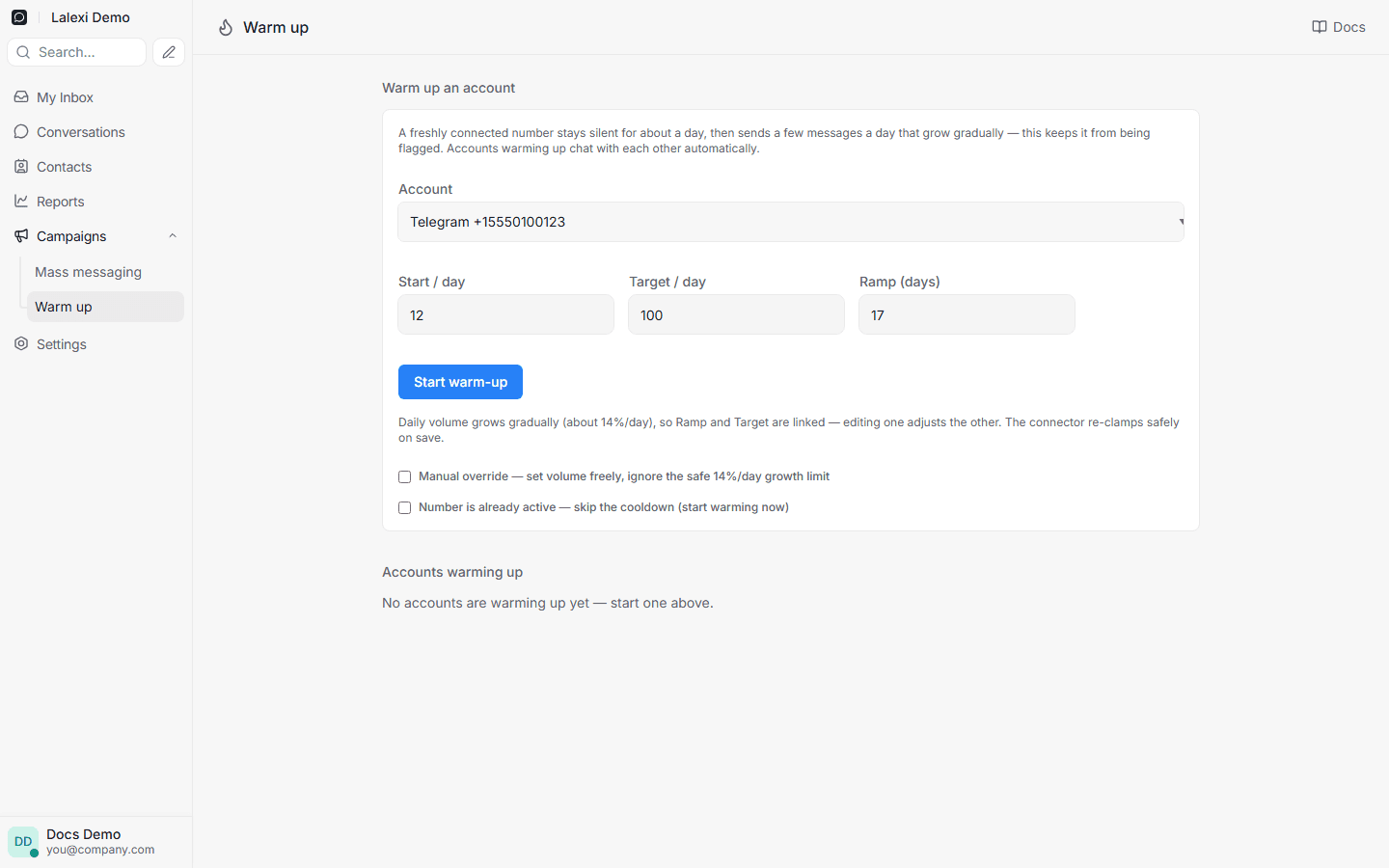
- Open Campaigns → Warm up.
- Pick a connected account.
- Set the ramp parameters:
- Start / day — the volume to begin at.
- Target / day — the volume to reach.
- Ramp (days) — how many days to reach the target.
- Click Start warm-up.
The parameters are linked: the daily volume grows by no more than ≈14% a day, so Target, Start and Ramp adjust automatically — changing one corrects the others. Values that are too steep aren't rejected; they are widened to a safe ramp on save.
Peer countries
When the warm-up pool has known countries for the channel, a "Warm on numbers from" block appears under the ramp parameters, listing countries and how many numbers each has.
- Warming against numbers from the same country the number will later write to builds a more believable local history.
- The "top up with other countries if there aren't enough" checkbox allows mixing in the rest. It is off by default: with few matching numbers you simply get fewer messages a day — other countries are never mixed in silently.
Extra options
- Skip the cooldown — if the number is already active, you can skip the silent day and start warming now.
- Manual override — set the volume freely, bypassing the safe daily increase.
Manual override exceeds the safe ≈14%/day pace and raises the risk of a WhatsApp ban. Use it only if you know what you're doing.
Statuses and control
| Status | Meaning |
|---|---|
| Cooldown | The cooldown day is running, the number is silent. |
| Warming up | The account has started ramping up. |
| Active | Warm-up is running normally. |
| Paused | Paused manually. |
| Completed | Reached the target volume. |
| Failed | Stopped because of sending errors. |
A pause isn't always manual: the reason is shown next to the status — "paused manually", "the account went offline" or "too many sending errors".
You can pause, resume or remove a warm-up. The account page shows its health (sent/failed over 7 days), a chart of incoming and outgoing per day and recent messages. A number that finished warming is marked "Ready for campaigns" there — mass messaging can run from it.
Warm-up's internal messages are not billable and don't show up in Usage as a campaign.