Reports and troubleshooting
Read the assistant's results, find out why it is silent and understand current limits.
Where to find results
Open Settings → AI Assistant → Reports, select the assistant and choose 7, 30 or 90 days. This tab brings together outcomes, hand-off reasons, daily or weekly trends and agents' reports about replies.
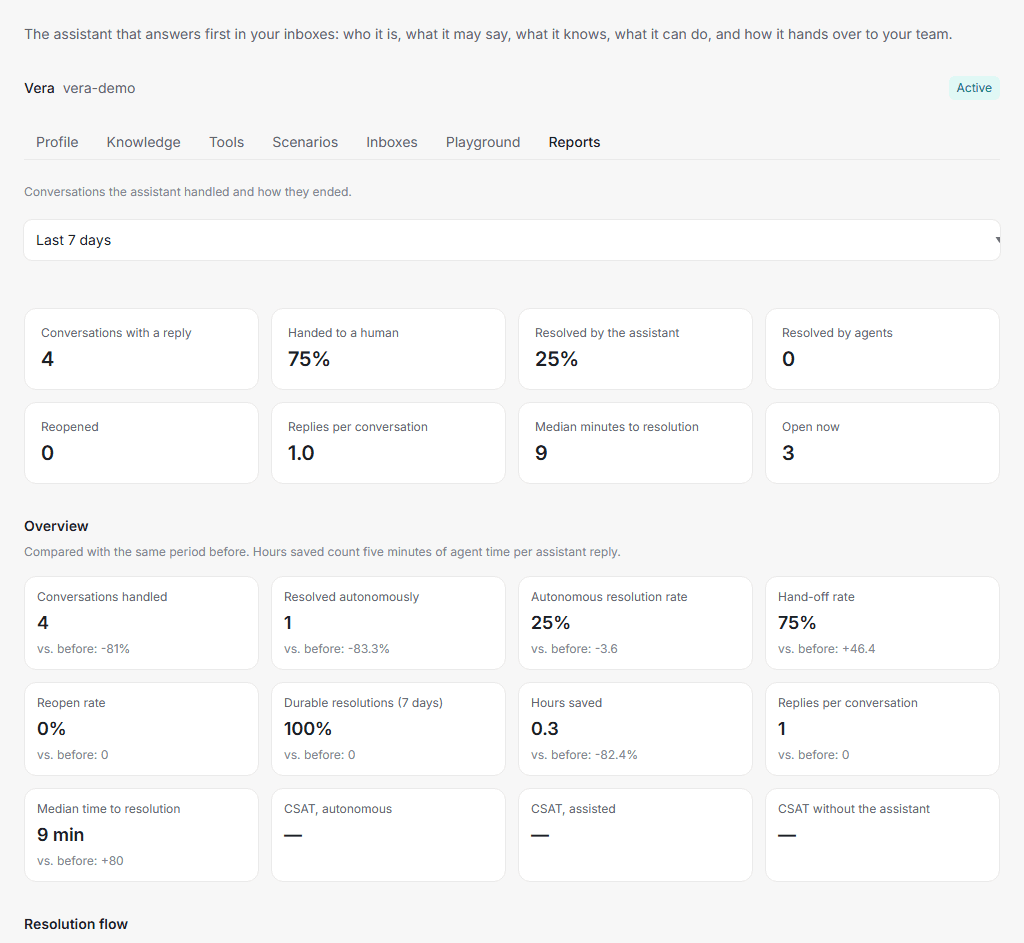
| Metric | Meaning |
|---|---|
| Conversations with a reply | Episodes with at least one assistant reply. |
| Resolved by the assistant | Autonomous resolution, including inactivity closure without a human hand-off. This is not a customer rating of the answer. |
| Handed to a human | Transfers to the team; reasons are shown separately. |
| Reopened | Returns to previously resolved conversations. |
| Hours saved | An estimate of five minutes of agent time per assistant reply, rather than measured working time. |
| CSAT | Customer satisfaction ratings, split into autonomous resolutions, assisted conversations and conversations without the assistant. Without ratings, a dash is shown. |
The Overview compares metrics with the previous period of the same length. Resolution flow shows how many handled episodes were resolved by the assistant, handed off or closed by the team, and reopens within seven days. Very recent resolutions may still be reopened later.
A conversation can contain several assistant episodes, for example after a customer returns. Counts therefore do not always represent unique customers or conversations. The top Conversations with a reply tile also differs from Conversations handled in the overview: the overview includes hand-offs without a reply.
Replies shows outcomes of individual attempts: answered, handed off, silent, error, taken over by an agent or skipped. Skipped does not always mean a failure: the schedule may have excluded that time. Messages that were never accepted for processing may not appear in these counters.
This is the assistant's own report. Its specific metrics and hand-off reasons are not added to the service's general reports. General reports may count the conversations and messages themselves, but should not be used to calculate the assistant's results.
Usage and cost
Open Settings → Billing and select a month. This page shows quantities used for calculation, rather than a monetary total. Ask your account manager for your plan's prices and terms.
AI agent conversations counts distinct conversations across the workspace with a recorded assistant answer for a calendar month in UTC. Several answers in one conversation during the month count as one AI conversation. The same conversation can count again in another month. An answer published to the customer in the conversation counts; internal preparation, knowledge searches and tool calls do not. Errors, skipped or silent attempts, and hand-off alone without a regular assistant answer do not add an AI conversation. Publishing an answer in the conversation does not confirm delivery to the messenger.
Paid messages are counted separately. On channels whose sends enter message usage, assistant replies also consume ordinary messages when the send is successfully accepted. For example, five such replies in one conversation during a month mean one AI conversation and five paid messages. These are two different quantities for calculation under your plan. Hand-off or closing notices sent to customers may also count as ordinary outgoing messages. The same message counter is used for the monthly limit.
The playground and Copilot do not themselves increase AI conversations or paid messages. If an agent sends a Copilot suggestion to a customer, it counts as an ordinary outgoing message under the channel's rules.
Article translation currently increases neither of these counters and is not included in Translated characters. That metric records message translation and outgoing translation previews, rather than help-center articles. This describes current tracking, not a promise of free use. Ask your account manager for article translation pricing terms.
Report a poor reply
Use the assistant message's menu in a conversation to report an incorrect or inappropriate answer. In Reports → Reported replies, you can see the reason, description, reporter and conversation link. Reporting helps investigate an issue; it does not automatically correct the reply or knowledge.
If the assistant is silent
Check in this order:
- Conversation status. The assistant does not answer in Open. Someone may have clicked Open or assigned an agent. Return the conversation to the bot, then check with a new incoming message in a test conversation.
- Channel. In Inboxes, the channel should say Answers here. If the assistant is Switched off or its bot is not registered, contact your account manager.
- Schedule. Compare When it answers in the profile with the channel's business hours. Replies are skipped outside the selected window.
- Audience and hand-off. The customer may be outside the selected audience. With hand-off set to Never, the assistant will not transfer the conversation even when it cannot answer. Open it and help the customer yourself.
- Message. A new incoming customer request is required. An internal note or agent message does not trigger a reply. Add a text question to an image. The assistant is separately disabled by default in group conversations.
- Limits and errors. Check the report, the reason in the internal hand-off note and limits. At a usage limit, the assistant may hand off; with hand-off disabled, it may leave the message unanswered.
If the cause remains unclear, send your account manager the assistant's name, channel, conversation link and message time. Mention whether Playground answers: this helps distinguish an answer problem from a channel connection problem.
If the assistant replies but ignores your materials, follow the knowledge check. An ordinary reply does not prove that knowledge search is working.
What the assistant cannot do yet
- Reliably process every image. Image content recognition is available when configured by the service, for up to three images per message. If an image cannot be accessed or recognised, no description is added. An image without text may be skipped entirely. Add a text question and check the result.
- Use unapproved knowledge or knowledge that is not ready for search. Conversation suggestions need review. Saved pairs without a search representation do not take part in retrieval.
- Perform every promised action from instructions alone. Checking an order or booking requires a working tool connection. The playground does not verify that connection.
- Always hand a conversation to a person. Hand-off depends on the profile mode. In Never mode, an agent must open the conversation themselves.
- Automatically fix knowledge from reports or translate the whole base. Employees review reported replies. Article translation is a separate action; it does not translate knowledge pairs or documents.
- Show all its analytics in general reports. Use the assistant's own Reports tab. It includes CSAT and resolution flow, but without the relevant conversations and customer ratings the data will be empty.