GuideConnections
MAX and MAX Bot
How to connect a personal MAX account by QR code and the official MAX bot with a token from business.max.ru.
MAX has two different connections, and the choice matters:
| Channel | What it is | How it is linked |
|---|---|---|
| MAX Personal | A personal account — your own number in MAX | QR code |
| MAX Bot | The official bot from the MAX business cabinet | token |
A personal account sees earlier chats and can write first. A bot only answers people who wrote to it — but it is official and doesn't depend on a phone session.
MAX Personal — personal account
What you need
- A phone with MAX signed in on that number.
- The MAX cloud password, if you have one set.
- A free slot in the connection limit.
How to connect
- Open Settings → Inboxes, press Add Inbox, pick the MAX Personal tile and press Connect. A tab with a QR code opens.
- Open MAX on your phone and scan the code.
- If the account has a cloud password, the page asks for it — type it and press Submit.
- Return to Lalexi: the page moves on its own to the Connection tab of the new inbox, with the Connected status.
After linking, choose which chats to mirror — on that same tab: Sync settings. A personal MAX account can use New message and campaigns.
MAX Bot — the official bot
What you need
- Access to the MAX business cabinet:
business.max.ru. - A bot created there (or the rights to create one).
How to connect
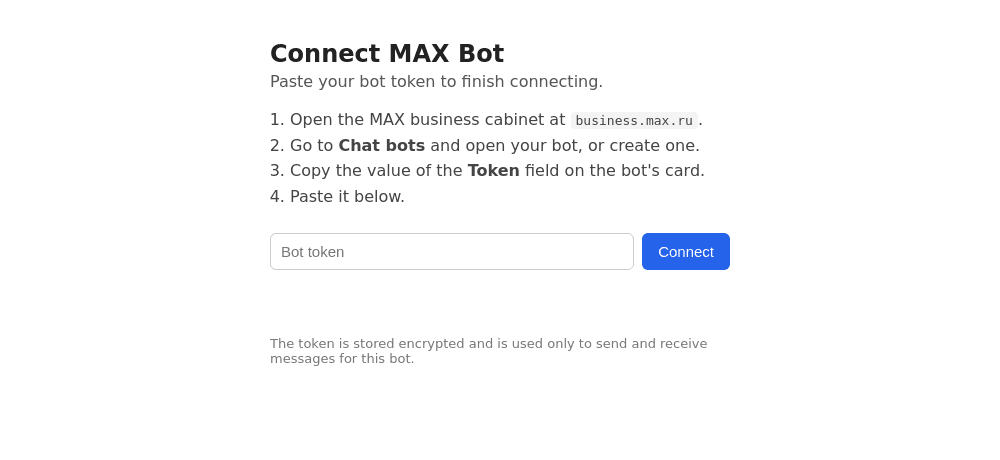
- In
business.max.ruopen Chat bots and select your bot (or create a new one). - Copy the Token field from the bot's card.
- In Lalexi open Settings → Inboxes, press Add Inbox, pick the MAX Bot tile and press Connect — a tab with a form opens.
- Paste the token and press Connect.
- Once it says "Connected", close the tab and return to Lalexi: the inbox appears with the Connected status.
The token is full access to the bot. Lalexi stores it encrypted, but never forward the token yourself. If it leaks, reissue it in the MAX cabinet and connect the bot again.
What the bot can and cannot do
- It only answers people who wrote first. So it is unavailable in New message, campaigns and warm-up.
- No chat list and no history. There is nothing to configure in sync settings: a conversation appears on its own with its first message.
- One-to-one chats only.
If something goes wrong
| Symptom | What to do |
|---|---|
| The form rejects the token | Check you copied the whole Token value, with no stray spaces. |
| The bot is connected but there are no conversations | That's expected until a customer writes to it. Share the bot's link. |
| The personal account asks for a password you don't know | That's the MAX cloud password; it can only be reset inside the messenger. |
| Status Reconnect required | On the Connection tab press Reconnect: a new QR code for the personal account, the token form for the bot. |