Viber Business
How to connect Viber Business Messages through your own Infobip account: API base URL, API key and the registered sender.
Viber Business is the official business sender on Viber: you message customers by phone number, and their replies land in the shared conversation list. The channel runs through Infobip, Viber's partner, and the Infobip account is yours — Lalexi connects to it with your key.
This is not the same as a Viber bot. A bot only answers people who wrote to it first and never sees their numbers. Viber Business is the opposite: it can write first by number, but it has no chat list.
What you need
- Your own Infobip account with a registered Viber Business sender. Infobip files the sender application and Viber approves it — without that there is nothing to connect, see below.
- An API key for that account with the Viber and Subscriptions scopes.
- The account's API base URL — it looks like
xxxxx.api.infobip.com. - A free slot in the connection limit.
The sender application
This is the longest part, and it comes before everything else. The partner — Infobip — files it, but the company gathers the material. How it runs, from signing up for the Infobip portal to the email thread with the ticket, is laid out on its own page: The Viber application via Infobip.
What the company gathers:
| What is needed | Details |
|---|---|
| Warranty Letter | Undertakings to Viber: message only people who consented and have not revoked it; comply with the law and with Viber's guidelines; never let a third party use the channel; do not promote competing messengers. Signed by an authorised person; the header carries the legal entity, the HQ address as in the registration documents and the beneficial owner (25% or more). |
| Service Qualification Form | The service name in the native language and in English, the website, the description, the country of registration, the industry. |
| Logos | PNG in six sizes: 50×50, 65×65, 100×100, 130×130, 256×256 and 360×280. |
| Countries | Where the messages will be sent. |
| Volume | The expected number of messages per month. |
| Message type | Promotional or transactional, plus a sample introductory message — with no promotion in it. |
| Integration type | One-way sending or a two-way conversation (we need two-way). |
Viber's own review usually takes two to three days, but the partner allows up to four weeks for the application as a whole: the rest goes on documents, questions and email. At the end the service gets its own Service ID, the Infobip contract is signed and the sender is switched on.
The warranty letter is not a formality. On a spam complaint Viber expects an answer within days and proof of consent from whoever you messaged, and every incident carries a penalty. Collect and keep opt-ins up front — they cannot be reconstructed after the fact.
Collect the details in Infobip
- Sign in to your Infobip dashboard.
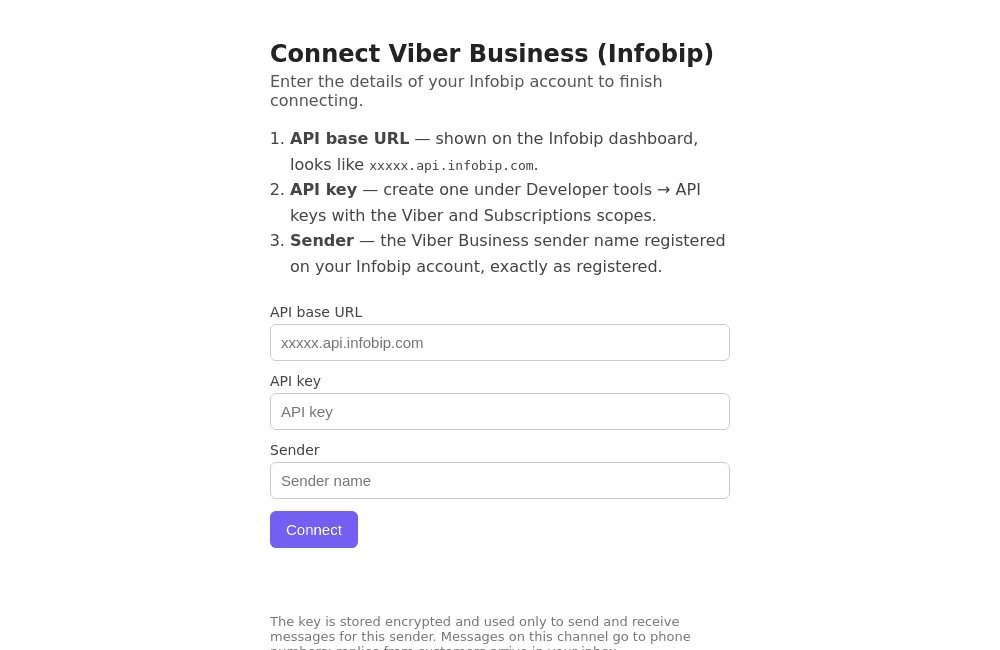
- The API base URL is shown on the dashboard — copy the whole host, for
example
xxxxx.api.infobip.com. - Create the API key under Developer tools → API keys and give it the Viber and Subscriptions scopes. Without them Lalexi can neither send messages nor subscribe to incoming ones.
- The Sender is the name of your registered Viber Business sender, exactly as registered on your account.
How to connect
- In Lalexi open Settings → Inboxes, press Add Inbox and pick the Viber Business (Infobip) tile.
- Press Connect — a tab with a form opens.
- Fill in API base URL, API key and Sender, then press Connect. The key is verified against Infobip right away: if it is wrong or missing a scope, the form says so.
- Once it says "Connected", close the tab and return to Lalexi: the inbox appears with the Connected status.
The API key is access to your Infobip account. Lalexi stores it encrypted and uses it only to send and receive messages for this sender. If it leaks, revoke it in Infobip, create a new one and connect the channel again.
What the channel can and cannot do
- It can write first to a phone number — the channel is available in New message, campaigns and warm-up.
- No chat list and no history. Viber gives a business sender no list of conversations, so there is nothing to configure in sync settings: a conversation appears on its own, either with the first incoming message or after you write first. Correspondence from before the connection is not pulled in.
- One-to-one chats only.
- Attachments: images and video go out as media, other files as a file. An incoming attachment larger than 25 MB is not mirrored.
- A long message is split, not refused — into 1000-character parts, which is Viber's limit.
What it costs
Messages on this channel are billed by Infobip under your contract, not by Lalexi. An agent's reply within the window after the customer's last message goes at the cheaper conversational rate; a message that opens a conversation costs more — check the exact rates in your Infobip dashboard.
In Lalexi's usage and limits the channel is counted as usual: the connection takes a slot, and messages you send count as paid.
If something goes wrong
| Symptom | What to do |
|---|---|
| The form says the link is no longer valid | The link lives for 30 minutes. Go back to Add Inbox and pick Viber Business (Infobip) again. |
| The key isn't accepted | Check the base URL (host only, no https:// and no path) and the key's scopes — Viber and Subscriptions are both required. |
| "Sender not found" | The sender name must match the one registered in Infobip character for character, including case and spaces. |
| Connected, but there are no conversations | That's expected: the channel has no chat list. A conversation appears with the first incoming message or after you write first. |
| A message didn't arrive | Check the customer has Viber installed and the number is in international format. |
Viber bot
How to connect a Viber bot to Lalexi: the bot application through a Rakuten Viber partner, what it asks for, and pasting the authentication token.
The Viber application via Infobip
The whole path to a Viber bot through a Rakuten Viber partner: signing up for the Infobip portal, the channel application, the bot form and the warranty letter, review times, and the token from the Viber app.